




Integrate your CRM with other tools
Lorem ipsum dolor sit amet, consectetur adipiscing elit lobortis arcu enim urna adipiscing praesent velit viverra sit semper lorem eu cursus vel hendrerit elementum morbi curabitur etiam nibh justo, lorem aliquet donec sed sit mi dignissim at ante massa mattis.
- Neque sodales ut etiam sit amet nisl purus non tellus orci ac auctor
- Adipiscing elit ut aliquam purus sit amet viverra suspendisse potenti
- Mauris commodo quis imperdiet massa tincidunt nunc pulvinar
- Adipiscing elit ut aliquam purus sit amet viverra suspendisse potenti
How to connect your integrations to your CRM platform?
Vitae congue eu consequat ac felis placerat vestibulum lectus mauris ultrices cursus sit amet dictum sit amet justo donec enim diam porttitor lacus luctus accumsan tortor posuere praesent tristique magna sit amet purus gravida quis blandit turpis.

Techbit is the next-gen CRM platform designed for modern sales teams
At risus viverra adipiscing at in tellus integer feugiat nisl pretium fusce id velit ut tortor sagittis orci a scelerisque purus semper eget at lectus urna duis convallis. porta nibh venenatis cras sed felis eget neque laoreet suspendisse interdum consectetur libero id faucibus nisl donec pretium vulputate sapien nec sagittis aliquam nunc lobortis mattis aliquam faucibus purus in.
- Neque sodales ut etiam sit amet nisl purus non tellus orci ac auctor
- Adipiscing elit ut aliquam purus sit amet viverra suspendisse potenti venenatis
- Mauris commodo quis imperdiet massa at in tincidunt nunc pulvinar
- Adipiscing elit ut aliquam purus sit amet viverra suspendisse potenti consectetur
Why using the right CRM can make your team close more sales?
Nisi quis eleifend quam adipiscing vitae aliquet bibendum enim facilisis gravida neque. Velit euismod in pellentesque massa placerat volutpat lacus laoreet non curabitur gravida odio aenean sed adipiscing diam donec adipiscing tristique risus. amet est placerat.
“Nisi quis eleifend quam adipiscing vitae aliquet bibendum enim facilisis gravida neque velit euismod in pellentesque massa placerat.”
What other features would you like to see in our product?
Eget lorem dolor sed viverra ipsum nunc aliquet bibendum felis donec et odio pellentesque diam volutpat commodo sed egestas aliquam sem fringilla ut morbi tincidunt augue interdum velit euismod eu tincidunt tortor aliquam nulla facilisi aenean sed adipiscing diam donec adipiscing ut lectus arcu bibendum at varius vel pharetra nibh venenatis cras sed felis eget.
LinkedIn works best when the people on your team post from their own profiles because the reach, trust, and inbound are higher. Almost every B2B marketing leader knows this.
The hard part has been getting a whole team to post consistently, in their own voice, about things that actually map to what the company is trying to say.
That is why WE ARE EXCITED TO ANNOUNCE LILY, your team's new AI content marketer, now live inside SocialKit.
Lily is available to every team member from the moment they sign up. She helps the team:
- Brainstorm post ideas grounded in your company's value proposition
- Draft posts in each person's individual writing voice
- Get instant feedback on drafts without waiting on marketing
- Spot what's working in their analytics and act on it
- Post on a smarter schedule based on what's already performing
What Lily Does
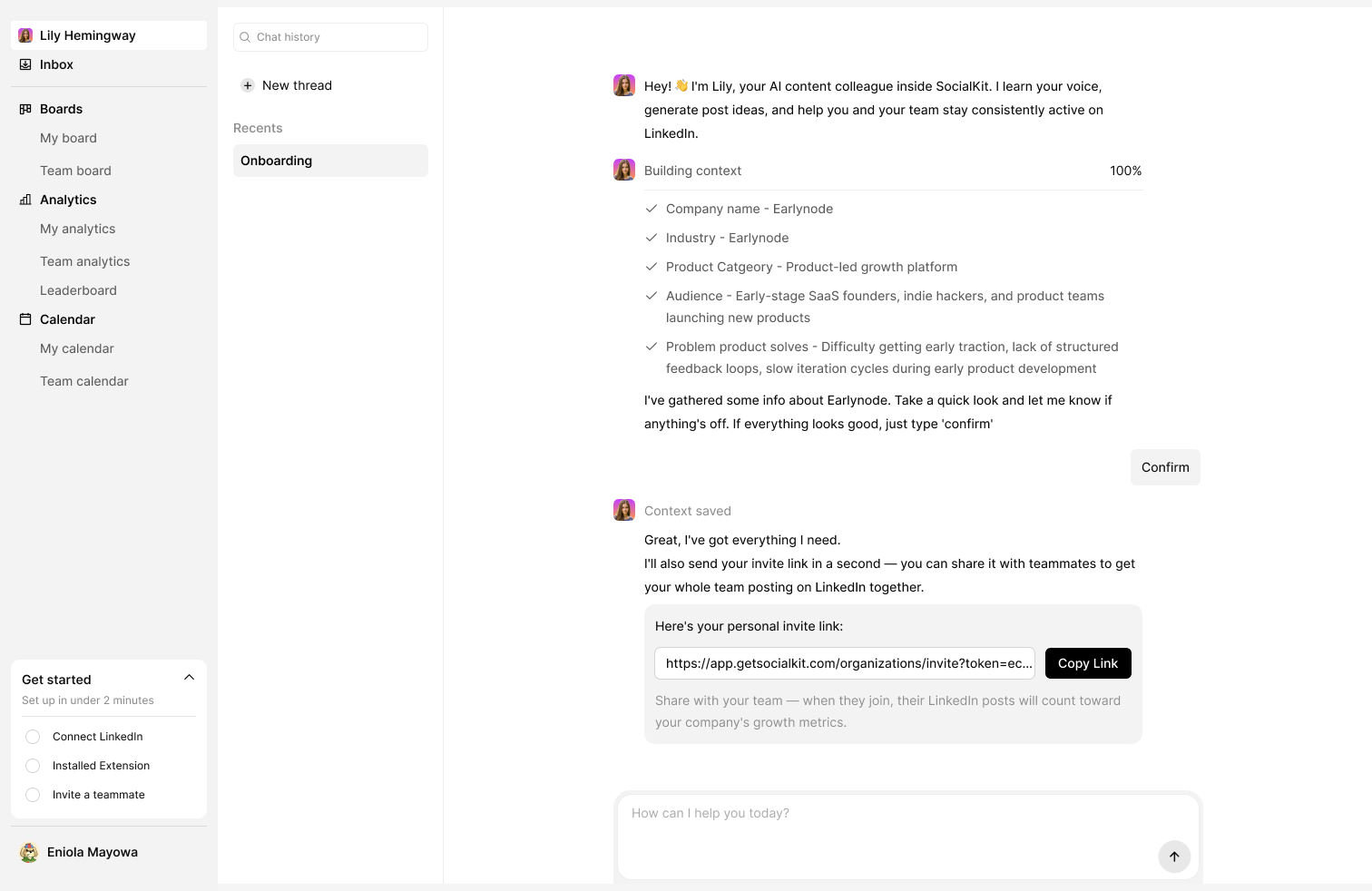
a. Builds a Profile of Your Company on Signup
The moment someone signs up, Lily reads the company website and builds a working profile of what the company does, who it serves, and how it positions itself.
You can sharpen her further by adding up to three context documents: a buyer persona doc, a messaging and positioning guide, a sales narrative, anything that helps her understand your business in more depth.
This context follows her into every conversation with every team member. Nobody has to explain the company from scratch when they ask her for help.
b. Learns How Each Person Writes
For every individual user, Lily reads their LinkedIn post history and builds a writing profile: tone, hook patterns, sentence structure, the formats they tend to use, the way they actually sound on the page.
The profile updates automatically as new posts are published. The more a person uses SocialKit, the more accurately Lily can draft in their voice.
c. Generates Post Ideas From Whatever You Bring
A rough topic. A half-finished thought. A note from a customer call. A recent product update. A vague hunch about something worth saying.
Lily turns any of these into structured post ideas to choose from, anchored in the company's positioning and shaped to fit the person's voice.
d. Drafts Posts in Each Person's Writing Voice
Once a direction is chosen, Lily writes a first draft.
The draft uses the person's writing profile, so the output sounds like them rather than like a generic AI assistant. Most drafts need light editing rather than full rewrites.
.png)
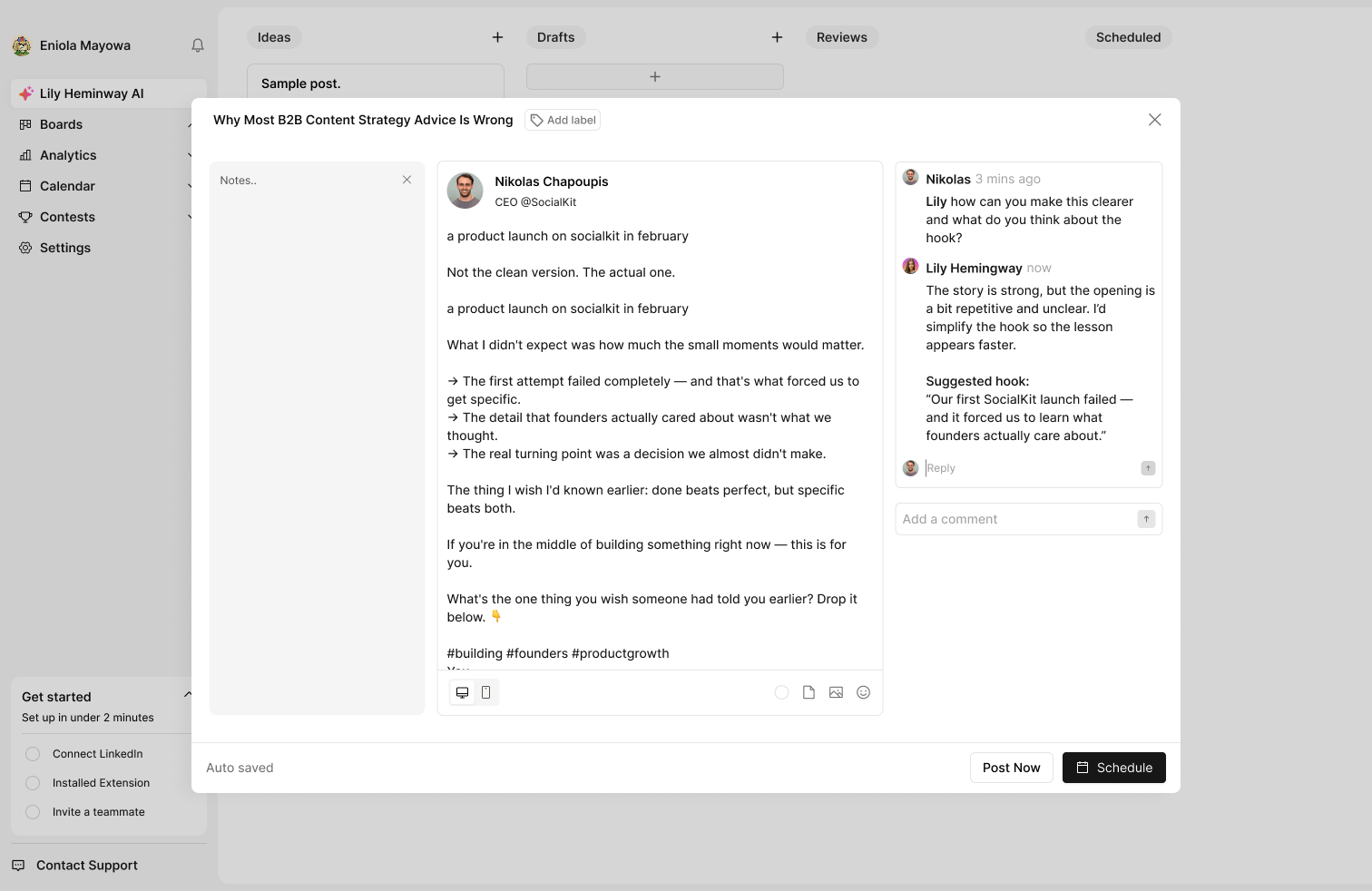
e. Reviews Drafts on Demand
Move a draft into the review column on the kanban board, or tag Lily on any post directly, and she will review it.
She flags weak hooks, unclear sentences, structural issues, and anything else worth tightening before publishing. The team no longer has to wait on marketing to get a second set of eyes on a draft.
f. Surfaces Analytics Insights Proactively
When a team member opens their analytics, Lily flags trends worth acting on, a post type that keeps outperforming, an engagement drop, a gap in posting frequency, a topic that's gaining traction.
She does not just point at numbers. She suggests specific next steps based on what the data is showing.
g. Suggests a Better Posting Cadence
Lily reviews the content calendar and recommends posting days and times based on what has historically performed well for each individual user.
Who Lily Is For
For Marketing Managers
Marketing no longer has to be the sole source of content support for every active poster on the team. Lily handles brainstorming, drafting, and review for everyone, which frees the marketing team to focus their energy on the people and posts that need the most strategic input — the CEO's narrative, a launch announcement, a sensitive thought-leadership piece.
For Executives and Active Posters
Anyone who wants to post on LinkedIn but never finds the time gets a brainstorming partner who already knows the company and how they write. Rough idea in, draft out, in their voice, ready to refine in minutes rather than hours. They stay in control of their voice and message without it taking significant time.
For Team Members Who Want to Post But Struggle to Start
Anyone on the team who wants to be active on LinkedIn but freezes at the blank page now has somewhere to begin. A thought, a voice note, a vague topic, any of it is enough. Lily asks the right questions and turns rough material into something structured.
Some people on the team will use Lily heavily. Others will use her for one part of the process. Both are fine. She is available to whoever needs her, in whatever role they need her for.
Why We Built Lily This Way
Most AI writing tools are trained on the entire internet and not much else. Ask one for a LinkedIn post and you get something competent, polished, and completely unattached to any specific person or company. The output reads like a stock photo, technically fine, but instantly forgettable.
So when we set out to build Lily, the only thing that mattered was context. She learns your company's positioning from your website and context documents. She learns each team member's writing style from their post history. Every output she produces is grounded in both.
Getting Started With Lily
Lily is included on every SocialKit plan at no additional cost. To start using her:
1. Sign Up for SocialKit
Create a free SocialKit account at app.getsocialkit.com/register. The first 14 days are free. No credit card required.
2. Connect Your Company Website
Lily reads your website during signup to better understand your company. Also add your URL in setup.
3. Add Context Documents (Optional)
For a sharper context, upload up to three documents, a buyer persona, a messaging and positioning guide, or any internal doc that explains how your company talks about itself.
4. Invite Your Team
Each team member who joins gets their own conversation with Lily. She will read their LinkedIn post history to build their individual writing profile.
5. Start Posting
Brainstorm, draft, review, schedule, and track all in one place, with Lily helping at each step.
FAQs About Lily
1. Is Lily included on all SocialKit plans?
Yes. Lily is available to every team member on every plan at no additional cost.
2. How long does it take for Lily to learn our company?
further sharpens her understandingLily builds her initial company profile from your website on signup. The process completes in minutes. Adding context documents sharpens her understanding further.
3. How long does it take for Lily to learn each team member's voice?
Lily reads each team member's LinkedIn post history when they connect their profile. For people with an established posting history, the profile is usable immediately. For people with little or no posting history, Lily's voice match improves the more they post through SocialKit.
4. Does Lily post on behalf of team members?
No. Lily helps brainstorm, draft, review, and analyze, but the account holder decides what gets published and when. The judgment stays with the human.
5. Can team members choose how much they use Lily?
Yes. Some people will use her for every step of the workflow. Others will only use her for one part, just the brainstorm, just the review, just the analytics nudge. Both work. She is available, not required.
6. Does Lily work for people who don't have a LinkedIn posting history yet?
Yes. For new posters, Lily starts with the company context and shapes a draft based on general best practices. As they publish more, her writing profile for them gets sharper.
7. Can I update Lily's context after signup?
Yes. You can update your website URL, replace or add context documents, and Lily will rebuild her understanding accordingly.
Lily Is Live in SocialKit Now
If your team has been trying to be more active on LinkedIn but execution keeps stalling, Lily is built specifically for that problem. You can start a 14-day free trial here.