

Integrate your CRM with other tools
Lorem ipsum dolor sit amet, consectetur adipiscing elit lobortis arcu enim urna adipiscing praesent velit viverra sit semper lorem eu cursus vel hendrerit elementum morbi curabitur etiam nibh justo, lorem aliquet donec sed sit mi dignissim at ante massa mattis.
- Neque sodales ut etiam sit amet nisl purus non tellus orci ac auctor
- Adipiscing elit ut aliquam purus sit amet viverra suspendisse potenti
- Mauris commodo quis imperdiet massa tincidunt nunc pulvinar
- Adipiscing elit ut aliquam purus sit amet viverra suspendisse potenti
How to connect your integrations to your CRM platform?
Vitae congue eu consequat ac felis placerat vestibulum lectus mauris ultrices cursus sit amet dictum sit amet justo donec enim diam porttitor lacus luctus accumsan tortor posuere praesent tristique magna sit amet purus gravida quis blandit turpis.

Techbit is the next-gen CRM platform designed for modern sales teams
At risus viverra adipiscing at in tellus integer feugiat nisl pretium fusce id velit ut tortor sagittis orci a scelerisque purus semper eget at lectus urna duis convallis. porta nibh venenatis cras sed felis eget neque laoreet suspendisse interdum consectetur libero id faucibus nisl donec pretium vulputate sapien nec sagittis aliquam nunc lobortis mattis aliquam faucibus purus in.
- Neque sodales ut etiam sit amet nisl purus non tellus orci ac auctor
- Adipiscing elit ut aliquam purus sit amet viverra suspendisse potenti venenatis
- Mauris commodo quis imperdiet massa at in tincidunt nunc pulvinar
- Adipiscing elit ut aliquam purus sit amet viverra suspendisse potenti consectetur
Why using the right CRM can make your team close more sales?
Nisi quis eleifend quam adipiscing vitae aliquet bibendum enim facilisis gravida neque. Velit euismod in pellentesque massa placerat volutpat lacus laoreet non curabitur gravida odio aenean sed adipiscing diam donec adipiscing tristique risus. amet est placerat.
“Nisi quis eleifend quam adipiscing vitae aliquet bibendum enim facilisis gravida neque velit euismod in pellentesque massa placerat.”
What other features would you like to see in our product?
Eget lorem dolor sed viverra ipsum nunc aliquet bibendum felis donec et odio pellentesque diam volutpat commodo sed egestas aliquam sem fringilla ut morbi tincidunt augue interdum velit euismod eu tincidunt tortor aliquam nulla facilisi aenean sed adipiscing diam donec adipiscing ut lectus arcu bibendum at varius vel pharetra nibh venenatis cras sed felis eget.
After 7 years and over 10,000 users, Shield Analytics is winding down. If you weren't using it, the announcement probably sounds like another tool sunset. For Shield users, this is the loss of a platform you built your entire LinkedIn measurement strategy around, and it raises real questions about reporting continuity, team accountability, and how to keep your employee advocacy program running without losing the data you've spent years collecting.
Since marketing and content cycles don't pause for you to rebuild your tech stack, this development can send teams scrambling for replacements out of desperation, which is usually counterproductive.
As short as the window for action is, the teams that navigate this situation well are the ones that pause, assess their operational dependencies, and rebuild with more visibility and control than they had before.
In this guide, we show how Shield users can find the clarity to restore stability and move their employee advocacy programs toward greater efficiency.
Quick Summary: What's Happening with Shield
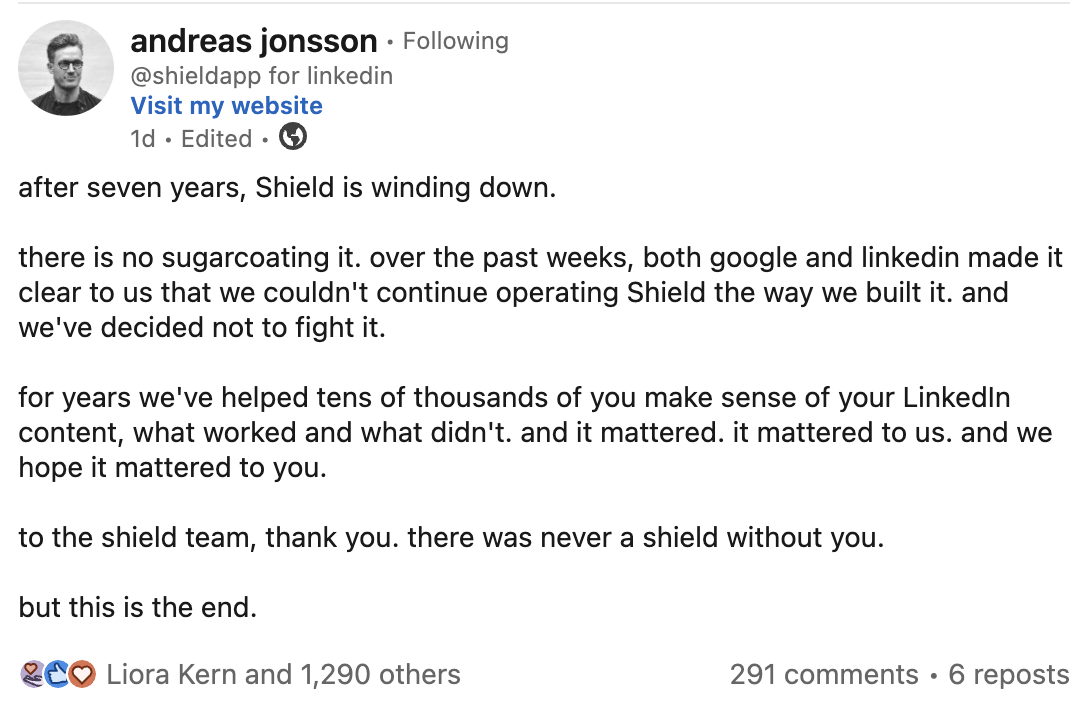
On the 18th of May, 2026, Shield Analytics announced it was discontinuing its services.
The announcement was made by the co-founders, Alex & Andreas, on the company's website and LinkedIn, citing an ongoing issue with on the company's website and LinkedIn, citing an ongoing issue Google and LinkedIn as the reason for the shutdown.
What This Means for Teams Using Shield
Marketing, content, and operations teams that depend on Shield for LinkedIn analytics will experience disruptions in their reporting cycles, especially if they don't export their historical data quickly enough.
Once portal access ends, teams will lose access to Shield's analytics dashboards and stored historical records, which could create gaps in year-over-year comparisons, executive reporting, and team accountability systems built around Shield's leaderboards.
Without a clear transition plan, weekly reporting rituals, monthly executive updates, and quarterly performance reviews could be significantly delayed.
Immediate Actions Teams Should Take
The window is short. You can't take the following actions early enough.
a. Export and back up all data
This step protects your team from permanent data loss. Although access to Shield's customer dashboards is expected to remain available for awhileAny delay in transferring your data will only increase operational risk.
Start with your highest-priority employees and most-used dashboards to minimize exposure. Depending on your team size, full exports can be completed within a few days.
Examples of data to download:
- Individual profile analytics for every team member
- Team-wide aggregated reporting
- Leaderboard data and historical rankings
- Post-level performance details
- Engagement and reach trends over time
- Custom tags, filters, and saved views
Use Shield's export tools (CSV, Excel, PDF) and download data in multiple formats. Store copies in at least two secure locations for redundancy.
b. Communicate with leadership and team members immediately
Confidence in your LinkedIn program will hold steady when your stakeholders hear about this from you first — not when reports stop showing up in their inbox.
Send a clear, calm message to your leadership team and to every employee whose profile was being tracked. Your communication might look like this:
Subject: Update on Our LinkedIn Analytics Platform
Hi team,
I'm writing to share an update about one of our key marketing platforms.
Shield Analytics, the tool we've been using to track individual and team LinkedIn performance, has announced it is winding down operations.
This will not interrupt our LinkedIn program or our ability to measure performance. Our team is actively managing the transition, and we're already taking the following steps:
- Exporting and backing up all historical performance data from Shield
- Evaluating replacement platforms that match (and ideally exceed) Shield's capabilities
- Maintaining our current reporting cadence with temporary processes during the transition
If you have any questions about how this affects your specific reporting, reply to this email or grab time on my calendar.
Thanks,[Your Name]
c. Audit current Shield workflows and dependencies
This step helps you understand what Shield actually did for your team, so you can replace it effectively — instead of underestimating how deeply it was embedded in your day-to-day operations.
Document:
- Every report Shield generated (individual, team, leaderboard, executive)
- The team members whose performance you tracked most actively
- Recurring rituals built around Shield data (Monday standups, weekly Slack updates, monthly reviews)
- Custom dashboards, saved filters, or tagged views you rely on
- Stakeholders who consume Shield reports (CMO, sales leaders, individual contributors)
This clarity helps you differentiate between processes that need a temporary workaround and those that can wait to be rebuilt in your new platform.
d. Stabilize recurring reporting cycles
Reporting deadlines don't recognize your technology challenges, so keeping your next executive update or board report on track is a priority.
While you still have portal access, complete and export any pending performance reports inside Shield so you don't carry unfinished items into your new system.
Temporary alternatives during the gap:
- LinkedIn's native analytics (limited but functional for individual profiles)
- Manual data pulls into a spreadsheet for critical metrics
- Short-term reduction in reporting frequency until your new platform is fully implemented
- Internal Slack or Notion-based leaderboards while you rebuild
e. Assess team capacity without Shield
With Shield no longer automating your reporting and accountability systems, that work returns to your team. Be honest about what that adds to your plate.
Calculate the additional hours per week required to manually pull data, build reports, and maintain leaderboards. Then compare that to your current team's bandwidth.
If your team can't absorb the gap, that's a strong signal you need to fast-track your replacement platform rather than relying on manual workarounds for long.
What Teams Should Ask Themselves Next
With urgent tasks like data export, stakeholder communication, and stabilization underway, the following questions help you take a strategic approach to replacing Shield.
What capabilities did Shield provide that we can't lose?
When you replace a tool like Shield too quickly, you may discover months later that the new system is a downgrade in the areas that matter most.
To get a replacement that genuinely fits (or exceeds) your needs, be clear about the capabilities your team can't operate without:
- Individual profile analytics for every team member
- Team-wide rollups and aggregated dashboards
- Leaderboards that drive accountability
- Historical trend data for year-over-year comparisons
- Engagement and reach tracking across multiple employees
This clarity helps you rebuild your stack intentionally, rather than buying a tool reactively.
What workflows depended on Shield?
The answer to this question maps the exact points in your LinkedIn program where Shield was operational, not just a reference tool.
Create a checklist for your processes. Start with your highest-frequency rituals (weekly updates, Monday team meetings) and work back to your lowest-frequency ones (quarterly executive reviews, board reporting).
Mapping these dependencies is necessary for filling the gap that now exists.
How much manual rework can we absorb temporarily?
As Shield winds down, your manual work will increase. Tasks that were previously automated now require hands-on processing and review.
Quantify it. Calculate how many additional hours per week your team needs for manual data pulls, leaderboard maintenance, and ad-hoc reporting requests.
Then ask:
- How many extra hours can each team member take on without affecting other priorities?
- How much delay will manual processes introduce into our reporting cycle?
- How long can we sustain manual work before quality drops or people burn out?
If the answers suggest higher chances of errors or fatigue, your replacement timeline needs to accelerate.
Do we need full automation or partial?
If your team relied on Shield for end-to-end LinkedIn analytics automation, you might want a replacement that offers similar coverage. But be sure of why.
Full automation makes more sense for teams running active employee advocacy programs at scale (10+ posters, weekly reporting, executive-level visibility).
Partial automation makes more sense for smaller teams (under 5 posters) where some manual review is acceptable and a heavier tool would be overkill.
This transition is an opportunity to reassess how much automation your team actually needs versus how much hands-on control you want to retain.
What's our budget for replacement tools?
Determining your budget early helps you narrow options quickly and saves the time of evaluating tools that don't fit your stage.
Use what you spent on Shield as a baseline, but be strategic. A lower-priced replacement may require more manual oversight or tool stacking. A higher-priced platform may reduce operational strain and add workflow features you didn't have before.
Factor in the cost of migration, team training, and any add-on integrations.
What to Evaluate in Your Next Employee Advocacy Platform
1. Feature Coverage
This transition should help you get a platform with more functional depth than Shield, but that won't happen unless you're clear on what sufficient coverage means for your team.
At a minimum, ask whether the platform can:
- Track individual and team-wide LinkedIn performance
- Generate leaderboards
- Collaborate with team members
- Run contests or competitions
- Pull historical data for trend analysis
- Provide post-level engagement and reach analytics
- Surface insights without requiring manual data pulls
2. Scalability & Team Size Fit
A platform is scalable when it meets your current and future needs. A tool that works for 10 employee profiles but struggles at 20 will create bottlenecks as your program grows.
Evaluate pricing carefully. Per-employee pricing scales with team growth and tends to scale better for growing employee advocacy programs.
3. Team Collaboration & Workflow Features
Shield was analytics-only. Many teams paired it with separate tools for content planning, scheduling, and team coordination.
If you're rebuilding anyway, consider consolidating. Your next platform should ideally support:
- Content planning and collaboration across multiple team members
- Scheduling and publishing to LinkedIn
- Review workflows for approvers
- Team communication around content
- Performance feedback loops tied to content decisions
Categories of Employee Advocacy Tools B2B Teams Should Consider
i. LinkedIn Analytics-Only Platforms
These tools focus exclusively on analytics, what Shield did. They track profile performance, generate dashboards, and surface engagement data.
Common features include individual profile analytics, post-level tracking, and basic team rollups.
Examples include Inlytics and similar single-purpose analytics tools.
Best for: Teams that only need analytics and already have separate tools for content planning, scheduling, and collaboration.
ii. Content Creation & Scheduling Tools
This category focuses on the content production side: AI-assisted writing, scheduling, and publishing. Some include lightweight analytics layered on top.
Common features include AI content generation, post scheduling, formatting tools, and limited reporting.
Examples include Taplio and AuthoredUp.
Best for: Solo creators or very small teams (1-3 people) where analytics depth is less critical than content velocity.
iii. Integrated Employee-Led Social Platforms
This category combines analytics, planning, collaboration, and publishing in one workspace and is designed specifically for B2B teams running employee-led LinkedIn programs.
Common features include individual and team analytics, leaderboards, content planning and collaboration, scheduling and publishing, AI assistance, and performance tracking across employee profiles.
This is where SocialKit fits. The category exists because teams that built LinkedIn programs around Shield consistently need more than just analytics; they need the workflow that goes with it.
Best for: B2B teams (typically 10 -50 employees) where multiple team members post for commercial purposes, and the team needs analytics, collaboration, and accountability in one place.
This Is the Time to Act Quickly and Rebuild Intentionally
As Shield winds down, its users tend to fall into one of two camps: those who react defensively and prolong the transition, and those who use this moment to reassess their LinkedIn stack and come out more capable than before.
The difference comes down to acting quickly, but calmly.
If you haven't already:
- Export and back up your Shield data
- Notify your team and leadership about the transition
- Shortlist replacement platforms and request expedited demos
When it comes to replacements, pick a direct Shield alternative like Socialkit, which has an integrated platform that combines analytics with the full workflow, planning, collaboration, scheduling, publishing, and performance tracking.
This is the fastest and least disruptive path back to stability. It keeps your team's LinkedIn motion intact while letting you rebuild reporting, accountability, and content workflows in one place, instead of duct-taping three tools together.
If you want to see how SocialKit can give your team the visibility, workflow, and accountability needed to run employee-led LinkedIn programs without rebuilding your stack from scratch, use code SHIELD50 for 50% off your first subscription.
You get a 14-day free trial, and no credit card is required to start.